YoloLab
HomeWorksGalleryWritingAbout
ZHEN
01Home02Works03Gallery04Writing05About
ZHEN
GitHub
← Back to the gallery

05 / AGENT SKILL / FILM BREAKDOWN

Video Shot Breakdown

Turn a reference video into a shoot-ready Excel plan, storyboard and reproducible prompts. Includes a downloadable skill and the Kitten Knight vs. Crimson Dragon example.

Downloadable skill2026-11-06Prompts included

Storyboard example

Download skill · ZIPOpen full-size PNG ↗Download SKILL.md
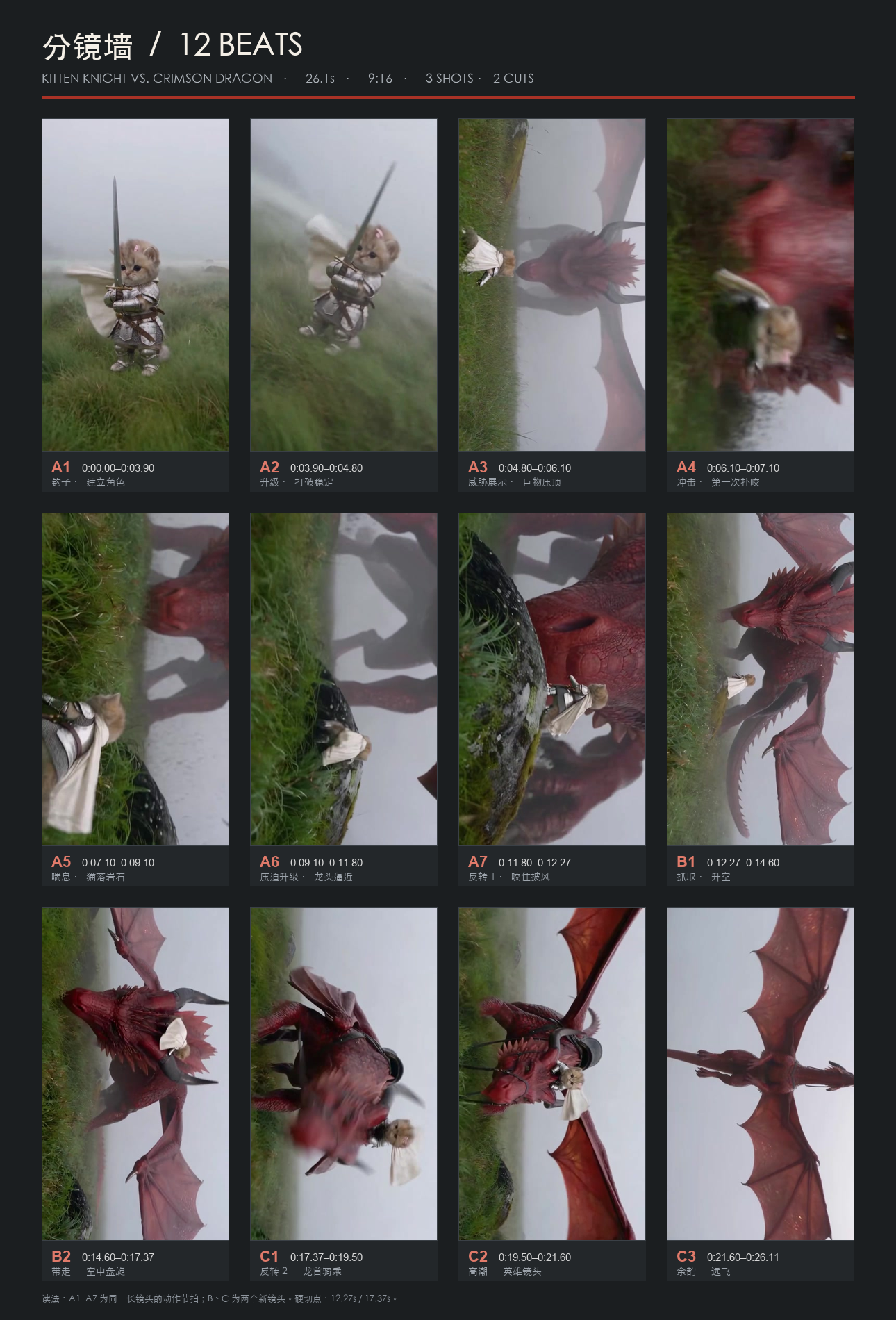
Twelve annotated storyboard beats from Kitten Knight vs. Crimson Dragon, grouped into three shots.
Example analysis · 26.1 seconds · 9:16 · 3 shots · 12 beats · 2 cuts. A1–A7 are beats within one continuous shot; the cuts are at 12.27s and 17.37s. Frames are from the supplied reference video, not footage generated by this skill.

How to use it

Download and extract the ZIP. Place the video-shot-breakdown folder in your agent’s skills directory, then invoke it with a video and any reference spreadsheet. The package includes SKILL.md, three production references and a Python timeline validator. Instructions are written in Chinese.

Outputs: Excel shot list, storyboard PNG and copyable prompts. Replace character and scene references before generation; adapt controls to your chosen model. Skill format and timeline checks passed; a second-video end-to-end run and generated-video reproduction have not been verified.

Build details

Built
2026-11-06
Updated
2026-11-07
Made with
Codex · video analysis + reusable skill
Stack
SKILL.md · Production references · Python timeline validator
Status
Live
  1. 2026-11-06A 26.1-second reference became a 3-shot, 12-beat storyboard and a reusable production workflow.
  2. 2026-11-07Published the skill package with its storyboard example.

Prompts

The original prompts behind each image, copy-ready for the same generation flow.

Source: video-shot-breakdown / SKILL.md

  1. English
    Use $video-shot-breakdown to analyze the attached video and reference spreadsheets. Deliver a shoot-ready Excel, a storyboard PNG and copyable per-shot prompts covering composition, camera angle and movement, scene, lighting, continuity and negative constraints. Separate observed shots from action beats and mark inferred settings.
  2. 中文
    用 $video-shot-breakdown 拉这条视频,参考附带表格,输出可拍摄的 Excel、分镜墙和逐镜复刻提示词。交代景别、机位、运镜、场景、光线氛围、负向约束与首尾衔接,区分真实镜头和动作节拍,并标注推测参数。

Download the skill↗Workflow, production references and timeline validator included.
INDEPENDENT PRODUCT LABStay curious. Keep building.

A little curiosity.
A new beginning.

Explore the work

EXPLORE

WorkGalleryWritingAbout

ELSEWHERE

GitHubX / Twitter

Ideas, experiments, and things shipped.

YoloLab
© 2026 YoloLab · yololab.cc · v2026.11.03END OF PAGE. NOT THE EXPLORATION.

CHANGELOG

Always building.

Every ship, polish pass, and fix, kept in one place and linked back to the page it shipped on. It hides in the footer — finding it counts.

  1. 2026-11-03Content

    The Super-agent series splits into three parts

    The design teardown, the media-site lessons, and the SKILL.md contract now live as three separate articles, with a shorter reading path and a working table of contents.

    Start with part 1
  2. 2026-10-29Infra

    A consent panel for first-party analytics

    TideStat and Minilytics share one consent panel; declining stops both.

  3. 2026-09-21Polish

    The changelog reads as a timeline

    The date and category now stick in a left rail and every entry hangs off a hairline with its own dot — same notes, easier to scan.

  4. 2026-09-16Ship

    This changelog, hidden behind the footer version

    The version number in the footer now opens this list. It is reachable on every page, sits outside the sitemap, and stays out of search results on purpose.

  5. 2026-09-16Ship

    Page transitions with a progress bar

    Navigating between pages now covers the gap with a transition layer and loading feedback, and it degrades to an instant jump under reduced motion.

  6. 2026-09-16Content

    Every exhibit got its own preview page

    Gallery exhibits now open real pages that carry the prompts, the build details and the reasoning behind each world, instead of stopping at a thumbnail.

    Open the Gallery
  7. 2026-09-16Content

    Tidal Letters: a six-chapter scroll voyage

    An impressionist scroll story built as six soft chapters. The page documents how the sequence was assembled, not just the final frames.

    Enter Tidal Letters
  8. 2026-09-16Polish

    An editorial footer

    The shared footer became a real directory: brand typography, a quieter closing rail, and navigation that works in both languages.

  9. 2026-09-15Ship

    Writing got categories, ideas and a morphing search

    The writing board gained category filtering and bilingual venture ideas, and the search control now morphs in place instead of jumping between states.

    Browse writing
  10. 2026-09-15Ship

    A section rail and a collapsed archive

    Long articles gained a section navigation rail, and the older archive months collapse behind a reveal control so the recent work stays reachable.

    Read a sample article
  11. 2026-09-14Content

    DYOR reports gained Lieflat charts

    Research reports render the same evidence charts through both the static shell and the D1 worker renderer, so a published figure cannot diverge between them.

    Open the research board
  12. 2026-09-14Ship

    The Gallery was rebuilt as interactive worlds

    The exhibit list became a full-screen orb stage with two enterable worlds, theme-aware covers and localized metadata for each one.

    Step into The Nameless Garden
  13. 2026-09-09Infra

    SEO P0: English by default, permanent 301s

    English became the default locale, www now redirects to the apex with a permanent 301, and x-default points at /en in both renderers.

Open the full changelog

Rendering